
Kotak (Indonesian for “box”) is a microVM sandbox platform built in Rust. The idea is simple: give each user an isolated environment to run arbitrary code in, spun up on demand, torn down when idle. Strong isolation, fast startup, clean API.
I Thought Spinning Up a VM Was Hard
I assumed the hardest part would be getting Firecracker itself to work. Firecracker has a reputation for being low-level: you’re essentially assembling a VM by hand, making individual HTTP calls to a Unix socket to configure each piece of it.
Turns out it was the easiest part of the whole project (seriously).
Firecracker ships pre-built kernel and rootfs images for exactly this purpose. You grab a vmlinux and a rootfs.ext4, then you’re just calling a REST API over a Unix socket:
PUT /machine-config          → vcpu count, memory
PUT /boot-source             → kernel path + boot args
PUT /drives/rootfs           → root ext4 image
PUT /network-interfaces/eth0 → TAP device name, MAC
PUT /vsock                   → guest CID, UDS path
PUT /actions                 → { "action_type": "InstanceStart" }
Six API calls. The VM boots. That’s it. The Firecracker model is deliberately simple; it’s not trying to be QEMU. One process per VM, minimal device model, no PCI bus.
So I made a simple wrapper: hyper connecting over a UnixStream, sending JSON bodies, and checking status codes.
async fn put(&self, path: &str, body: serde_json::Value) -> Result<()> {
    let stream = UnixStream::connect(&self.socket_path).await?;
    let io = TokioIo::new(stream);
    let (mut sender, conn) = hyper::client::conn::http1::handshake(io).await?;
    // ...
}

// example
pub async fn configure_machine(&self, vcpus: u8, memory_mb: u32) -> Result<()> {
    self.put(
        "/machine-config",
        json!({
            "vcpu_count": vcpus,
            "mem_size_mib": memory_mb
        }),
    )
    .await
}
So making a VM is basically just wrapping HTTP lol.
* note: it was easy for me because I have a bare-metal Linux machine with KVM enabled. It might be much more complicated if you don’t have one.
The Actual Hard Part
Everything around the VM!
Like the custom rootfs, lifecycle, and networking. All the things that make a VM actually useful.
Networking: TAP Devices
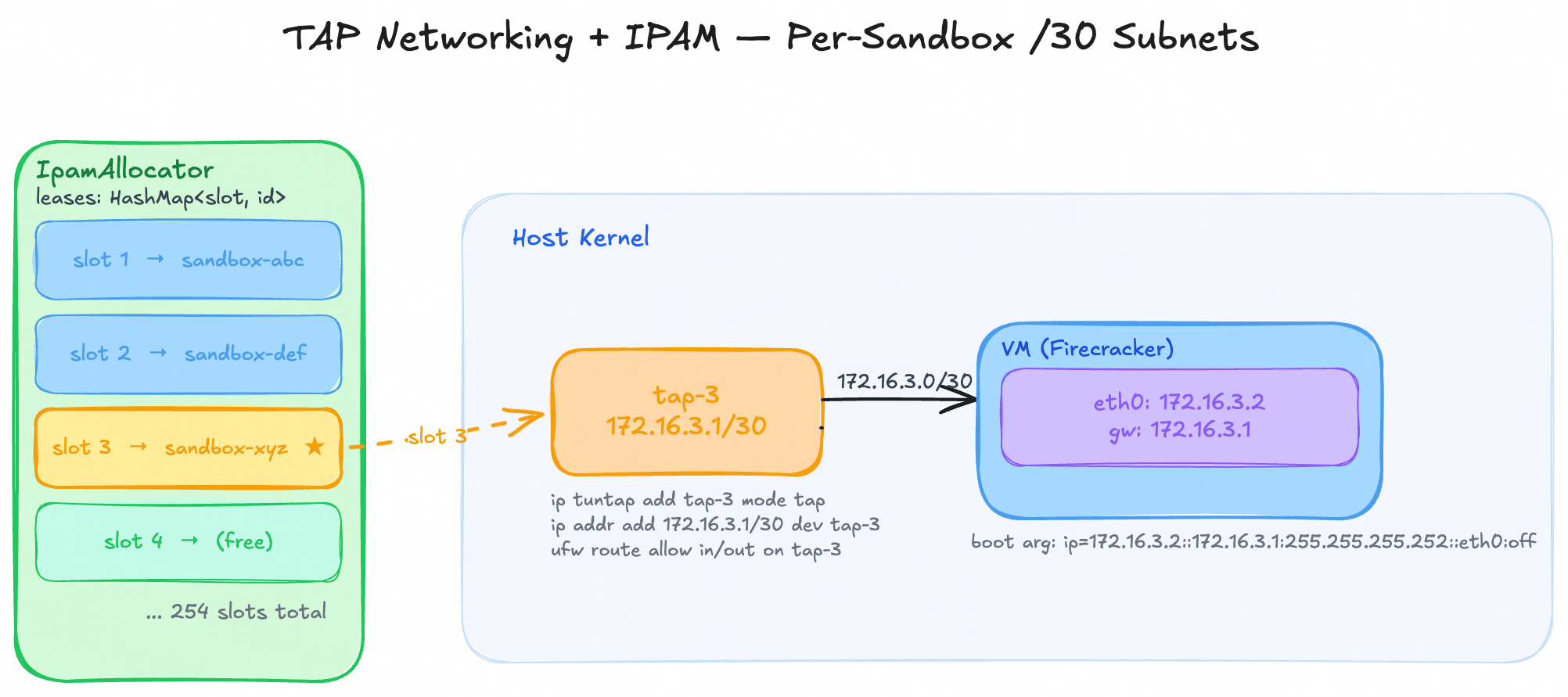
When a Firecracker VM boots, it has a virtual NIC, but that NIC needs to connect to something on the host. That something is a TAP device.
A TAP device is a virtual network interface that lives in the host kernel. When the VM sends a packet, it comes out the TAP device as a raw Ethernet frame that you can read and route like any other interface.
The key insight is that Firecracker doesn’t do any networking itself; it just passes packets in and out to the TAP via its eth0 NIC. Everything else (routing, NAT, DHCP) is your problem.
For Kotak, each sandbox gets its own /30 subnet:
172.16.{slot}.0/30
  172.16.{slot}.1  →  TAP on host (acts as gateway)
  172.16.{slot}.2  →  eth0 inside the VM
The VM learns its IP not from DHCP but from the kernel command line. Firecracker lets you pass arbitrary boot args, and the Linux kernel’s ip= parameter handles static IP configuration at boot:
ip=172.16.{slot}.2::172.16.{slot}.1:255.255.255.0::eth0:offI built a simple IP Address Manager that just assigns a slot when a VM is created and returns its IP address.
Setting up the TAP on the host side is a few ip commands:
ip tuntap add tap-{slot} mode tap
ip addr add 172.16.{slot}.1/30 dev tap-{slot}
ip link set tap-{slot} up
I put this command as part of the VM boot sequence.
Accessing the Internet: NAT and Masquerading
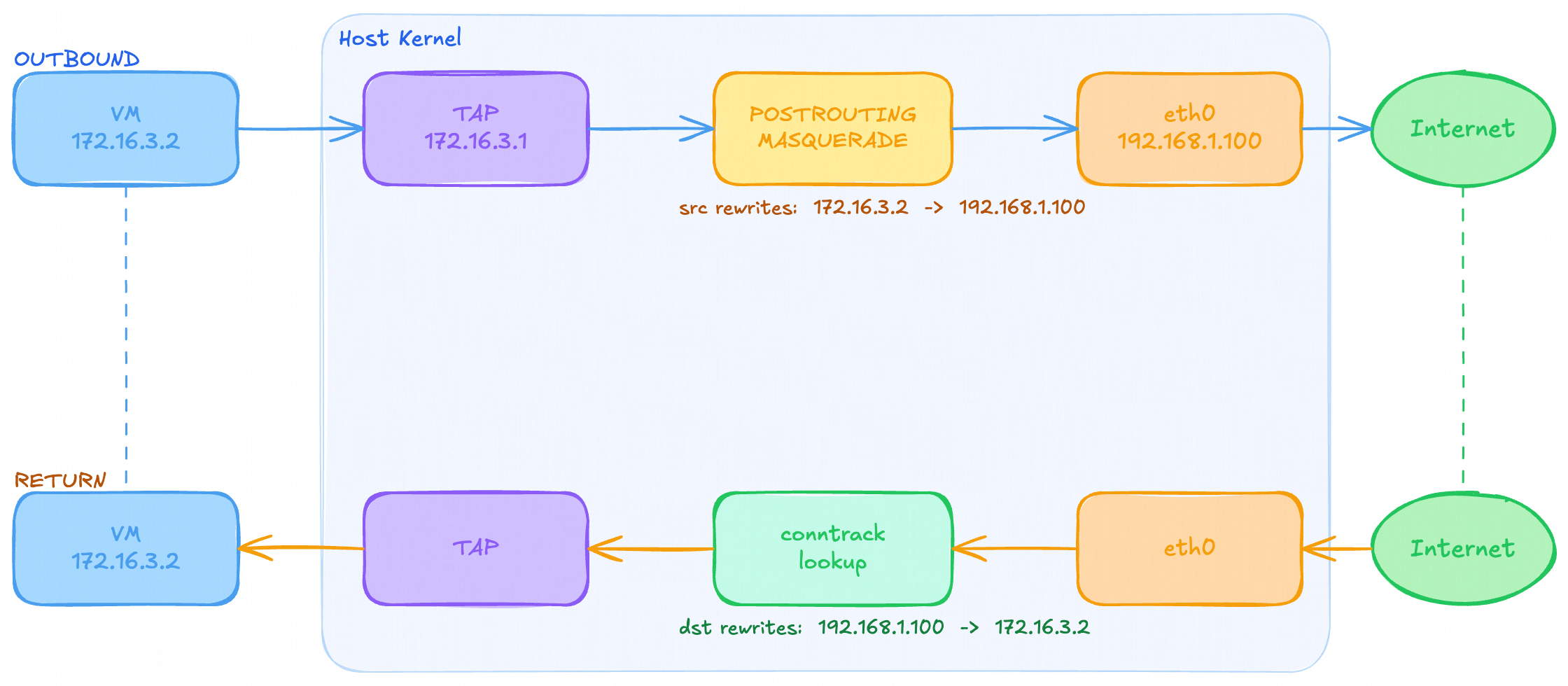
Getting the VM onto the internet requires one more step after the TAP is up. The VM can reach its gateway (the TAP address) just fine, but packets going beyond that need somewhere to go.
The host’s outbound interface, say eth0 at 192.168.1.100, is what actually has a route to the internet. The VM’s IP (172.16.x.2) is private, made up, and unknown to anyone outside the host. If a packet from the VM reaches the router with a source of 172.16.x.2, the router has no idea where to send the reply. The packet gets dropped.
Masquerading fixes this. You add one iptables rule on the host:
iptables -t nat -A POSTROUTING -s 172.16.0.0/16 -o eth0 -j MASQUERADESo for any packet leaving through eth0 that originated from the 172.16.0.0/16 range, rewrite its source IP to look like it came from eth0’s address. To the outside world, the packet looks like it was sent by the host itself.
When the reply comes back, the kernel’s connection tracking (conntrack) remembers the original sender and rewrites the destination back to the VM’s IP before forwarding it down the TAP.
MASQUERADE specifically is the right target here rather than SNAT (static NAT). SNAT requires you to hardcode the outbound IP: --to-source 192.168.1.100. MASQUERADE reads the outbound interface’s current IP at packet time, which means it keeps working if the host’s IP changes.
One thing you do need to make sure is that IP forwarding is enabled on the host:
echo 1 > /proc/sys/net/ipv4/ip_forwardWithout this, the kernel will refuse to forward packets between interfaces, and the whole chain goes nowhere regardless of what your iptables rules say. It’s off by default on most systems.
Blocked by Firewall: UFW
Even with masquerading set up and IP forwarding enabled, the first time I actually tried to reach the internet from inside a VM, it just didn’t work. Pings to 8.8.8.8 went nowhere. The iptables rules looked correct, the TAP was up, the VM had its IP, and everything seemed fine.
Well, turns out the packets were blocked by UFW.
UFW (Uncomplicated Firewall) is the default firewall manager on most Linux systems. The problem is that UFW sits on top of iptables and manages its own
FORWARDchain rules. By default, UFW’s policy for forwarded packets isDROP.
So even though the kernel was willing to forward packets from the TAP to eth0, UFW was dropping them before they got anywhere.
The fix is to explicitly allow routing through the TAP device:
ufw route allow in on tap-{slot}
ufw route allow out on tap-{slot}
These two rules tell UFW to permit forwarded traffic flowing in and out through that specific TAP interface. In the code this happens as part of setup_tap, right after bringing the interface up:
run_cmd(&["ufw", "route", "allow", "in",  "on", &net.tap_name]).await?;
run_cmd(&["ufw", "route", "allow", "out", "on", &net.tap_name]).await?;
And they get cleaned up on teardown:
run_cmd(&["ufw", "route", "delete", "allow", "in",  "on", &net.tap_name]).await?;
run_cmd(&["ufw", "route", "delete", "allow", "out", "on", &net.tap_name]).await?;
Why not just use a bridge?
The alternative is putting all TAP devices on a shared bridge, the way Docker does it. That gives you easy inter-container routing. But for a sandbox platform, inter-sandbox routing is exactly what you don’t want. By giving each sandbox a dedicated /30 and not bridging them together, sandboxes are network-isolated from each other at the kernel level, not just by firewall rules.
Port Forwarding: DNAT
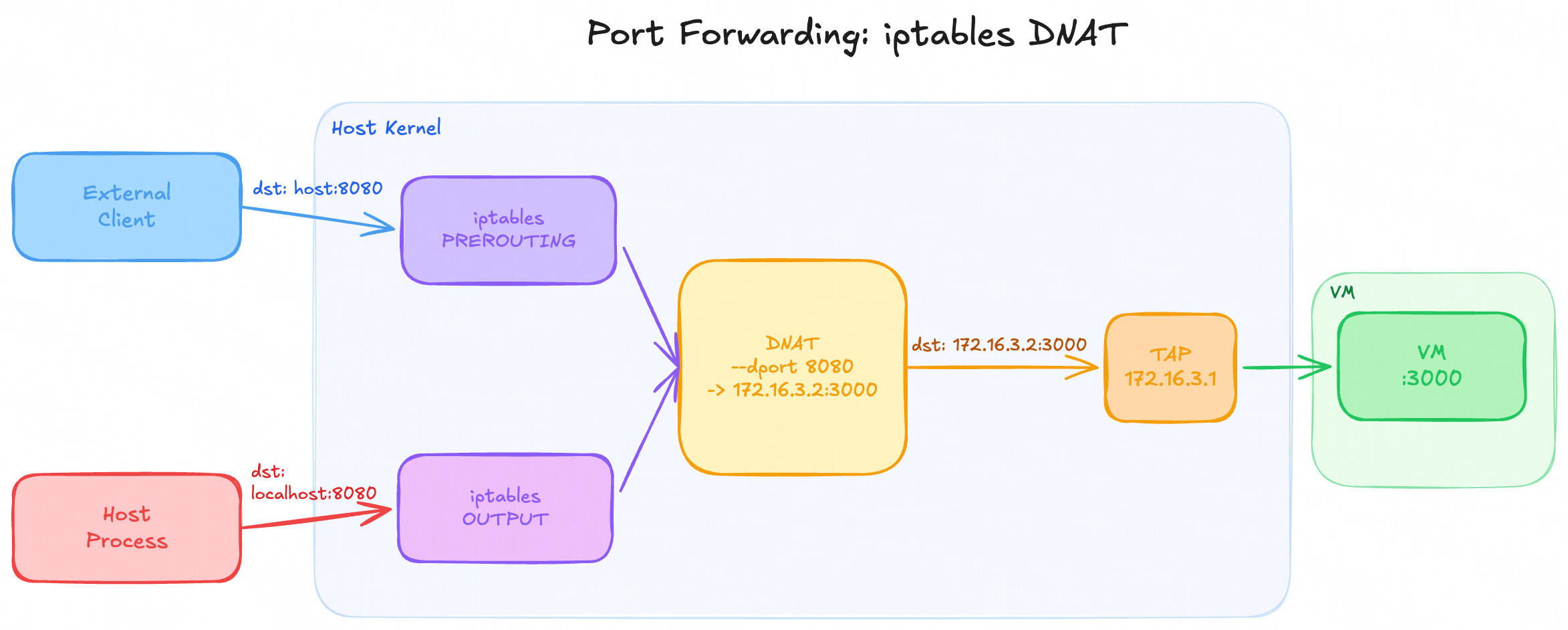
Letting users expose ports from inside the VM to the outside world requires iptables DNAT. There’s a subtlety here: PREROUTING only applies to traffic entering from an external interface. Traffic originating from the host itself goes through OUTPUT. So you need both:
iptables -t nat -A PREROUTING -p tcp --dport {host_port} -j DNAT --to-destination {guest_ip}:{guest_port}
iptables -t nat -A OUTPUT     -p tcp --dport {host_port} -j DNAT --to-destination {guest_ip}:{guest_port}
VSock: It’s Just a Socket
The first approach for sending commands to the guest was SSH. It works, but it’s heavy: key management, an SSH daemon, network dependency, noticeable connection latency.
Firecracker supports vsock: a socket type that crosses the VM boundary directly through the hypervisor, bypassing the network stack entirely. It works even if the VM’s networking is completely broken, which is useful during development.
The surprising thing about vsock is how unsurprising it is once you use it. It’s a socket. You bind, listen, accept, read, write.
But first you have to enable vsock in your kernel
# Enable
sudo modprobe vhost_vsock

# Check
lsmod | grep vsock

# Auto start
echo "vhost_vsock" | sudo tee /etc/modules-load.d/vhost_vsock.conf
The only Firecracker-specific part is that the host side connects through a Unix domain socket proxy (the vsock_uds_path you configure before boot). The connection handshake mimics how AF_VSOCK works over a stream:
Host sends:     "CONNECT 52\n"
Guest responds: "OK <cid> <port>\n"
After that, it’s just a bidirectional byte stream.
For the protocol, I went with length-prefixed JSON frames. Every message is a 4-byte big-endian length followed by that many bytes of JSON:
[00 00 00 2A][{"type":"exec","command":"echo hello"}]Length-prefixing solves framing, you always know exactly how many bytes to read before you have a complete message. Without it you’d be trying to detect message boundaries in a raw stream, which is fragile.
The guest agent handles one request per connection: accept, read one frame, dispatch it, write back response frames, and close. For exec, it streams chunks back as the process produces output:
{"type": "stdout", "data": "hello\n"}
{"type": "exit",   "code": 0}
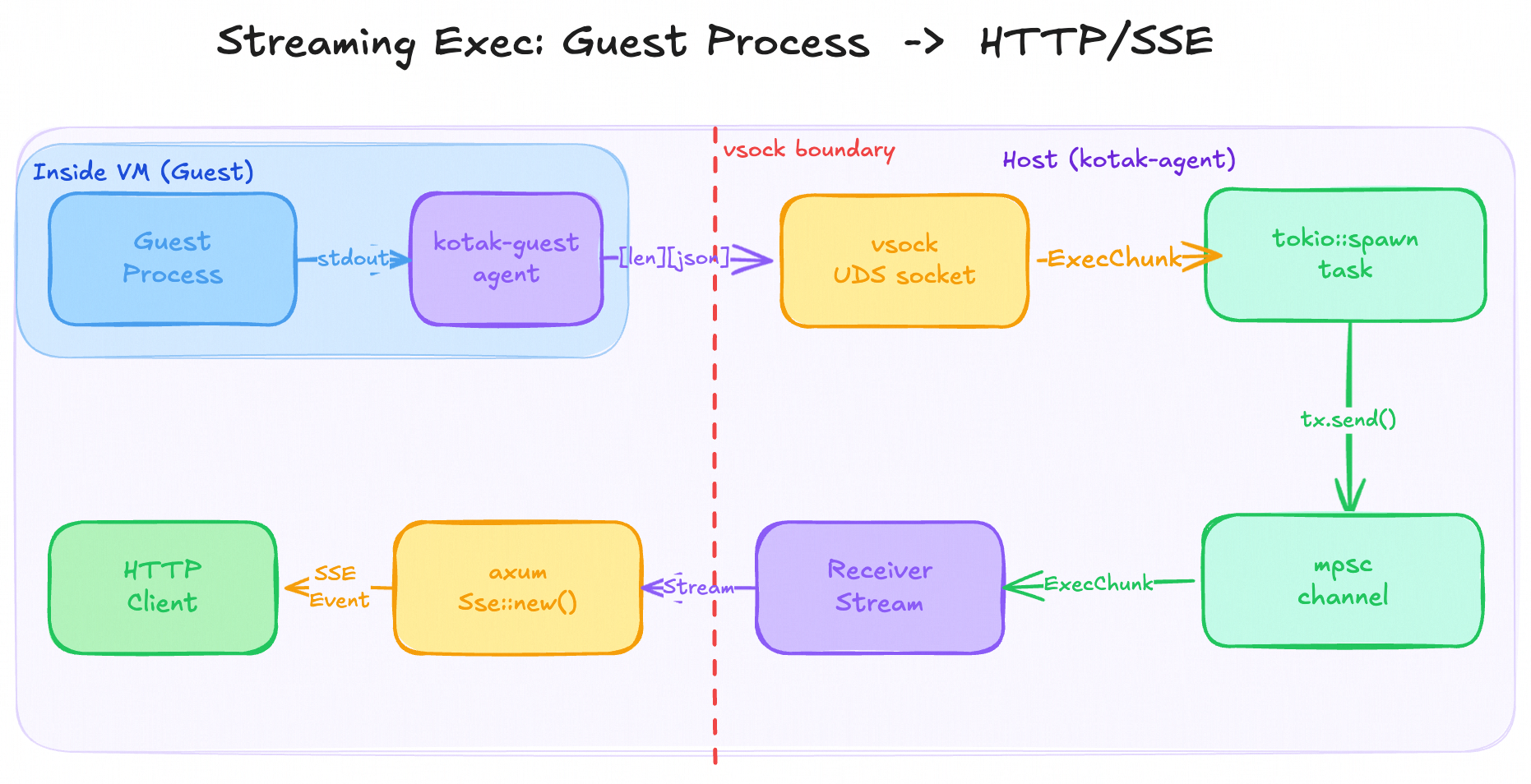
The host side for streaming exec spawns a Tokio task that reads frames and forwards them into an mpsc::channel, which the axum handler then converts into a Server-Sent Events stream for the HTTP client.
Streaming Exec Over SSE
Blocking exec is simple: wait for the process to finish, collect all output, and return it. But for anything long-running, we want output as it happens: a build log, a test suite, a server’s stdout. Waiting until the process exits before returning anything is a bad experience and a PITA when trying to fine-tune the timeout duration.
The solution is to stream output back over Server-Sent Events.
SSE is a plain HTTP response where the connection stays open and the server pushes newline-delimited events down it. It’s simpler than WebSockets for this use case because it’s unidirectional: the client just listens.
The challenge is that the output is coming from inside a VM over vsock, and it needs to make its way to an HTTP client. There are three layers involved and they each need to be connected: the vsock reader, an in-process channel, and the HTTP response stream.
Layer 1: vsock to mpsc channel
When exec_stream is called on the VsockClient, it connects to the vsock socket, sends the exec request, and then immediately returns a channel receiver. A Tokio task is spawned to do the actual reading in the background:
pub async fn exec_stream(&self, command: &str) -> Result<mpsc::Receiver<ExecChunk>> {
    // ... connect, handshake, send request ...

    let (tx, rx) = mpsc::channel(32);

    tokio::spawn(async move {
        loop {
            let mut len_buf = [0u8; 4];
            if stream.read_exact(&mut len_buf).await.is_err() { break; }
            let len = u32::from_be_bytes(len_buf) as usize;

            let mut buf = vec![0u8; len];
            if stream.read_exact(&mut buf).await.is_err() { break; }

            match serde_json::from_slice::<ExecChunk>(&buf) {
                Ok(chunk) => {
                    let is_exit = matches!(chunk, ExecChunk::Exit { .. });
                    if tx.send(chunk).await.is_err() { break; }
                    if is_exit { break; }
                }
                Err(e) => { tracing::error!("chunk parse fail: {}", e); break; }
            }
        }
    });

    Ok(rx)
}
The spawned task reads length-prefixed frames off the vsock connection and sends each decoded ExecChunk into the channel. When it sees an Exit chunk it stops. The caller gets rx immediately and can start consuming chunks as they arrive.
Layer 2: mpsc channel to SSE stream
The axum handler receives the channel and needs to turn it into an HTTP response. tokio_stream::wrappers::ReceiverStream wraps the mpsc::Receiver into a Stream, the async iterator abstraction that axum’s SSE support expects.
Each chunk gets mapped to an SSE Event:
async fn exec_stream_sandbox(...) -> axum::response::Response {
    let rx = {
        let sandboxes = state.sandboxes.read().await;
        match sandboxes.get(&id) {
            Some(s) => s.exec_stream(&body.command).await,
            None => return StatusCode::NOT_FOUND.into_response(),
        }
    };

    match rx {
        Ok(rx) => {
            let stream = ReceiverStream::new(rx).map(|chunk| {
                let data = match &chunk {
                    ExecChunk::Stdout { data } => json!({"type": "stdout", "data": data}),
                    ExecChunk::Stderr { data } => json!({"type": "stderr", "data": data}),
                    ExecChunk::Exit   { code  } => json!({"type": "exit",   "code": code}),
                };
                Ok::<Event, Infallible>(Event::default().data(data.to_string()))
            });
            Sse::new(stream).into_response()
        }
        Err(e) => (StatusCode::INTERNAL_SERVER_ERROR, e.to_string()).into_response(),
    }
}
There’s one subtlety in the handler: it acquires the read lock, calls exec_stream, and then drops the lock before returning the SSE response.
This is important because if the lock were held across the entire streaming response, no other request could read the sandbox map until the command finished. The background vsock task and the SSE stream run entirely without holding any lock.
Building the Rootfs
The rootfs is an Alpine Linux ext4 image. The naive way to build one is to set up a chroot, install packages, and bundle it up. The less-obvious way is simpler: run a Docker container with the desired packages, copy its filesystem into a mounted ext4 image, and you’re done.
dd if=/dev/zero of=rootfs.ext4 bs=1M count=512
mkfs.ext4 rootfs.ext4
mount rootfs.ext4 /tmp/my-rootfs

docker run --rm -v /tmp/my-rootfs:/my-rootfs alpine sh -c '
    apk add openrc openssh bash python3 nodejs ...
    for d in bin etc lib root sbin usr; do tar c "/$d" | tar x -C /my-rootfs; done
'
The container runs, installs everything into itself, and tarballs its own directories into the mounted image. No VM required, no full OS installer. Docker is just being used as a convenient sandboxed package manager.
The kotak-guest binary gets compiled separately to x86_64-unknown-linux-musl. The musl target produces a fully static binary with no dynamic linker dependency, so it can be dropped into any rootfs and just run (perfect for Alpine!).
Putting It Together
The full lifecycle when you hit POST /sandboxes/create:
- Sparse-copy the base ext4 image (cheap on disk thanks to
cp --sparse=always) - Allocate a
/30subnet slot from the IPAM pool - Create the TAP device and assign the host-side IP
- Spawn a Firecracker process for this sandbox
- Configure the VM over its Unix socket and send
InstanceStart - Poll the guest’s SSH port until the VM is up (~1.5s cold)
- Send a vsock exec to regenerate SSH host keys so each sandbox gets unique keys
- Return
{"id": "...", "guest_ip": "172.16.x.2"}
Destroy unwinds all of it: stops the VM, removes iptables rules for any forwarded ports, deletes the TAP device, releases the IP slot, removes the sandbox directory.
Snapshots: Hibernate and Resume
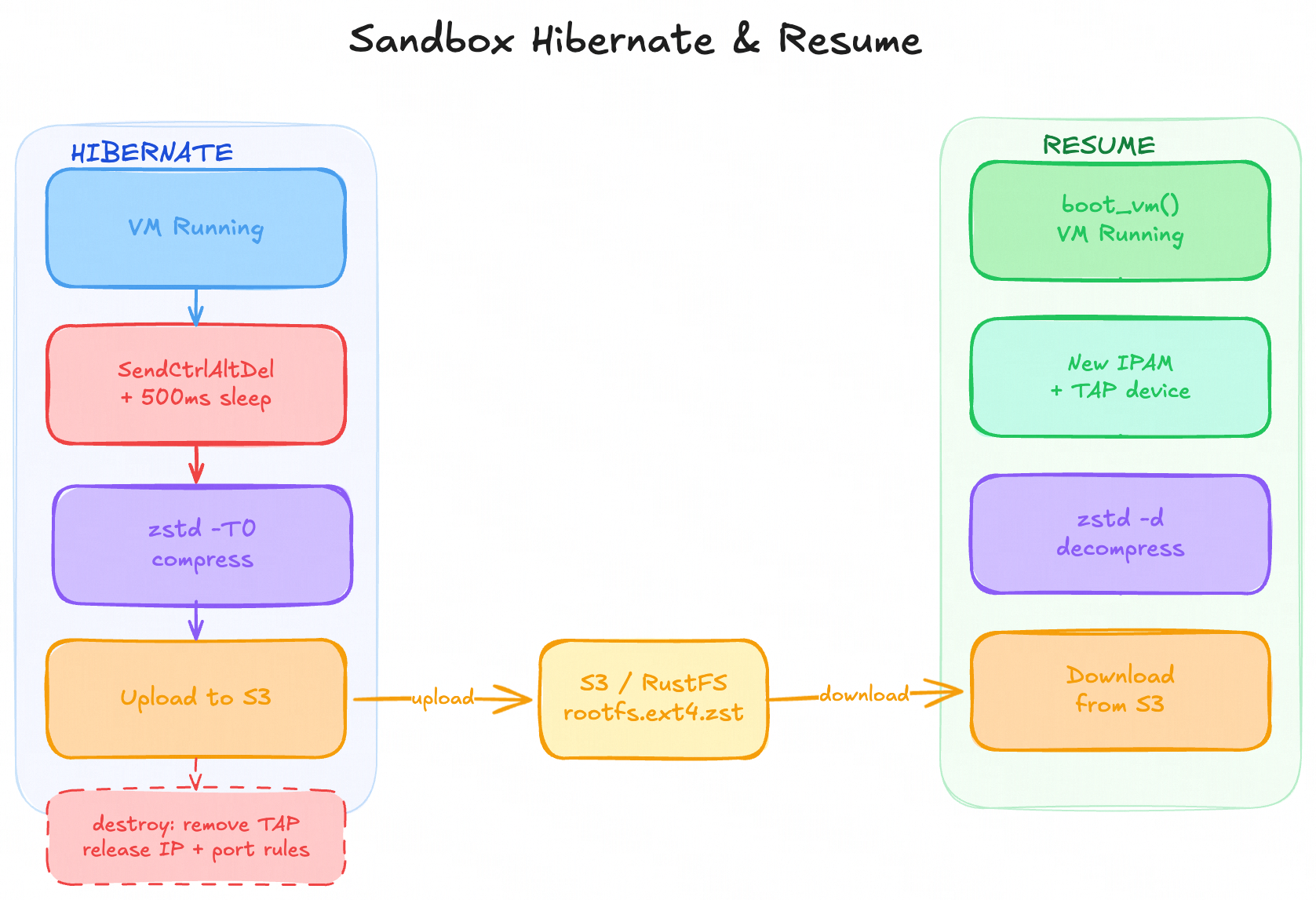
Sandboxes shouldn’t live forever. A user spins one up, does some work, goes idle. Keeping the VM running, with its memory allocated, its TAP device held, its IP slot taken, for a sandbox nobody is using is wasteful. But destroying it outright loses the user’s work.
The answer is hibernation: snapshot the sandbox’s filesystem, tear it down cleanly, and store enough state to bring it back later.
What Gets Snapshotted
Firecracker has a built-in snapshot mechanism that captures the full VM state (CPU registers, memory, device state) into a file. Restoring from it resumes the VM mid-execution, exactly where it left off, in under a second.
Kotak doesn’t use that.
Instead it snapshots at the filesystem level only. The approach: shut the VM down cleanly, compress the ext4 rootfs image, upload it to object storage. Resume means download, decompress, boot a fresh VM against the restored image.
The reason for this is simplicity and storage efficiency:
- If we snapshot the VM including its memory and CPU, it means we’re compressing the allocated RAM. This would consume a lot of storage.
- Restoring from a very specific state means we have to reconfigure the IP address when it’s resumed.
- Lowkey, there’s a high chance your program will crash anyway after restoration.
- Vercel Sandbox doesn’t snapshot everything either 🤡.
So the snapshot is just used for snapshotting the storage and potentially be used for VM “forking” feature.
VM Hibernate
pub async fn hibernate(
    self,
    store: &SnapshotStore,
    ipam: &IpamAllocator,
    port_manager: &PortManager,
) -> Result<()> {
    self.client.stop().await?;
    tokio::time::sleep(std::time::Duration::from_millis(500)).await;
    store
        .snapshot_filesystem(&self.id, &self.fs.rootfs_path(&self.id))
        .await?;
    self.destroy(ipam, port_manager).await
}
stop() sends SendCtrlAltDel to the VM to gracefully shutdown. The 500ms sleep gives the guest a moment to flush any pending writes to the ext4 image before we touch it. Then the filesystem gets snapshotted and the sandbox is torn down normally: port forwards removed, TAP deleted, IP slot released.
snapshot_filesystem does two things: compress and upload.
pub async fn snapshot_filesystem(&self, sandbox_id: &str, rootfs_path: &Path) -> Result<()> {
    let archive_path = PathBuf::from(format!("/tmp/{}-rootfs.ext4.zst", sandbox_id));

    run_cmd(&[
        "zstd", "-q", "-T0",
        rootfs_path.to_str()...,
        "-o", archive_path.to_str()...,
    ]).await?;

    self.upload(sandbox_id, &archive_path, "rootfs.ext4.zst").await?;
    tokio::fs::remove_file(&archive_path).await?;
    Ok(())
}
zstd -T0 compresses using all available CPU cores. A 512MB ext4 image (mostly empty on a fresh sandbox) compresses down to a few megabytes because zstd sees through the sparse zeroed blocks. A heavily used sandbox with a full filesystem will compress less aggressively, but zstd’s compression ratio on typical filesystem data is still good.
The compressed archive is uploaded to RustFS (an S3-compatible object store running locally in Docker) under the key {sandbox_id}/rootfs.ext4.zst, then the local temp file is cleaned up.
VM Resume
pub async fn resume(
    id: &str,
    ipam: &IpamAllocator,
    fs: FilesystemManager,
    store: &SnapshotStore,
    config: &SandboxConfig,
) -> Result<Self> {
    let rootfs_path = fs.prepare_empty(id).await?;
    store.restore_filesystem(id, &rootfs_path).await?;

    let net = ipam.allocate(id).await?;
    let (process, client, vsock) = boot_vm(id, &rootfs_path, &net, config).await?;

    Ok(Self { ... })
}
prepare_empty creates the sandbox directory but doesn’t copy the base image. This is because the restored filesystem is coming from the snapshot, not the base.
restore_filesystem downloads the compressed archive and decompresses it into that path:
pub async fn restore_filesystem(&self, sandbox_id: &str, dest_rootfs: &Path) -> Result<()> {
    let archive_path = PathBuf::from(format!("/tmp/{}-rootfs.ext4.zst", sandbox_id));
    self.download(sandbox_id, "rootfs.ext4.zst", &archive_path).await?;

    run_cmd(&["zstd", "-d", "-q", "-f",
        archive_path.to_str()...,
        "-o", dest_rootfs.to_str()...,
    ]).await?;

    tokio::fs::remove_file(&archive_path).await?;
    Ok(())
}
After that, boot_vm runs the normal boot sequence against the restored image: allocate a TAP, spawn Firecracker, configure and start the VM. The sandbox comes back up with all the files the user had written, a fresh IP and TAP assignment, and a new Firecracker process.
GC-Triggered Hibernation
Hibernation doesn’t only happen on explicit request. The garbage collector runs every 60 seconds and hibernates any sandbox idle longer than the configured threshold:
let idle: Vec<String> = {
    let sandboxes = state.sandboxes.read().await;
    sandboxes
        .values()
        .filter(|s| now.saturating_sub(s.last_active_secs()) > idle_secs)
        .map(|s| s.id.clone())
        .collect()
};

for id in idle {
    let sandbox = state.sandboxes.write().await.remove(&id);
    let Some(s) = sandbox else { continue };
    s.hibernate(&state.store, &state.ipam, &state.port_manager).await?;
}
The read and write locks are deliberately separated. Collecting the list of idle IDs under a read lock keeps the map available to other requests during the check. Each sandbox is then removed and hibernated one at a time under a write lock, so a slow upload to object storage doesn’t block the entire sandbox map for the duration.
last_active_secs is an AtomicU64 that gets updated on every vsock call: exec, file read, file write, and mkdir. If the sandbox is being used, it stays alive. If nobody touches it, the GC eventually collects it.
What’s Next
The platform works end-to-end: sandboxes boot, accept commands, forward ports, hibernate, and resume. What it’s missing is the layer above:
- Auth — the API is currently unauthenticated
- WebSocket PTY — interactive terminal access from a browser
- Detached exec — long-running commands with a command ID you can poll later
- Warm pool — pre-booted VMs handed out on create, cutting cold-start from ~1.5s toward ~200ms
- Subdomain routing —
{id}-{port}.domain.commapped dynamically to forwarded ports, for shareable sandbox URLs
Repo: https://github.com/naufalw/kotak
Thanks for reading!